SEE Result 2082/2083 has been published today on 26th Baisakh 2083 (11th May 2026). The National Examination Board (NEB) has published the SEE Class 10 result for students who appeared in the Secondary Education Examination. Students can now check their SEE result with marksheet online using their symbol number and date of birth.
The SEE examination 2082 was conducted from 2nd April 2026 to 12th April 2026 which is 19th Chaitra 2082 to 29th Chaitra 2082. More than 4 lakh students appeared in the exam from different parts of Nepal. Students can check their result through the official websites, NTC website, SMS, and IVRS service.
SEE Result 2083 Published Today
The National Examination Board has published the SEE Result 2083 today, 26th Baisakh 2083. Students who were waiting for their Class 10 result can now view their GPA, grade, and result status online. To check the result, students need to enter their SEE symbol number correctly.
| Board Name | National Examination Board |
| Exam Name | NEB SEE Exam 2083 |
| Result Name | Secondary Education Examination (SEE) Result 2083 |
| Category | Result |
| Session | 2082 – 2083 |
| Exam Date | 2nd April 2026 to 12th April 2026 (Chaitra 19 to Chaitra 29, 2082) |
| Result Date | 12th May 2026 (29th Baisakh 2083) Tentative |
| Result Link | Check SEE Result |
| Result Link | see.ntc.net.np |
| Official Website | see.gov.np |
SEE Result 2082 Statistics
According to the national SEE result data, a total of 430,667 students were included in the SEE 2082 result. Out of them, 284,160 students passed, while 146,507 students received NG. The overall pass percentage of SEE 2082 is 65.98%. The highest number of students are in the GPA 2.80 to below 3.20 group, while 48,392 students scored GPA 3.60 to 4.00.
| S.N. | Grade Group | Total Students |
|---|---|---|
| 1 | GPA 1.60 to below 2.00 | 7 |
| 2 | GPA 2.00 to below 2.40 | 5,190 |
| 3 | GPA 2.40 to below 2.80 | 55,977 |
| 4 | GPA 2.80 to below 3.20 | 94,222 |
| 5 | GPA 3.20 to below 3.60 | 80,372 |
| 6 | GPA 3.60 to 4.00 | 48,392 |
| 7 | NG | 146,507 |
| Total | Total Students | 430,667 |
| Total Pass Students | 284,160 |
| Total NG Students | 146,507 |
| Total Students | 430,667 |
| Pass Percentage | 65.98% |
How to check the see.ntc.net.np 2083 Results for Class 10?
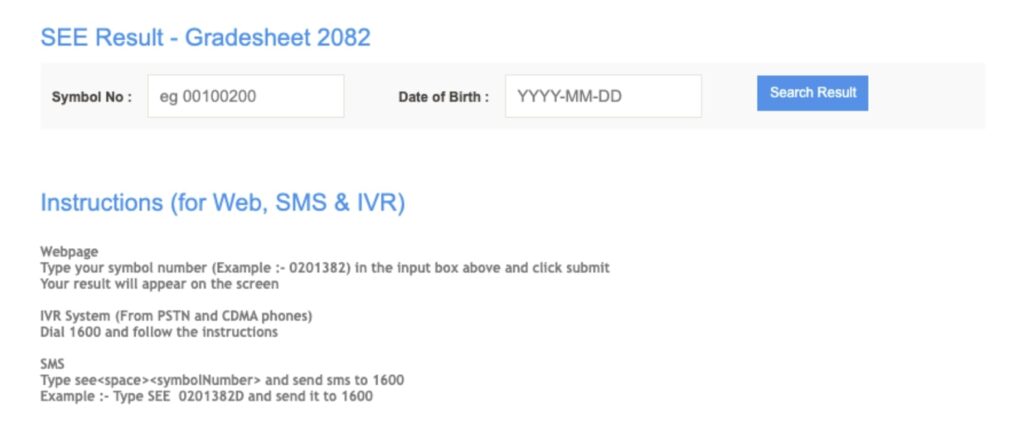
- Go to the official website see.gov.np
- Select SEE Exam Result 2083
- Enter your Symbol Number & Date of Birth as on your Admit Card
- Click the submit button to see your SEE Result 2083
- Save your SEE Result 2083 as PDF or take a printout for future use
While waiting for the results, students can visit the SEE official website to verify and download their grade reports. To access their scorecards, go to the Secondary Examination Education website, press the Result Tab, select the SEE result, and download the Class 10 Marksheet.
SEE Result 2083 via NTC SMS
- Open the SMS program on your phone
- Type: SEE <Symbol Number>
- Send it to 1600
- You will receive an SMS containing your SEE Result 2083
To pass the SEE exams, students must score a D grade or above in each subject. They must also score satisfactory marks in both theory and practical exams. A passing certificate is awarded only if a student scores D or above in all subjects. If they fail in theory or practical, their external exam result is withheld for a year. Grade improvement is required if they fail two out of eight subjects.
How to Check SEE Result 2083 via Call (IVRS)
- Dial 1600 (IVRS number)
- Follow the voice instructions
- Enter your Symbol Number and Date of Birth when asked
- Your result will be read over the phone
- Note down your result for future reference
Details Mentioned on SEE Result 2083
- Name of the examination
- Board
- Student’s name
- Class
- Symbol number
- Date of birth
- Subject names
- Subject codes
- Grade in theory
- Grade in practical
- Total marks
How to Check The SEE Result 2083 through official websites
To check the SEE Results via official websites, follow these steps and get your results on your mobile phone:
- Go to the official website of NEB SEE Result 2083 at neb.gov.np
- Click on the link “SEE Result 2083”.
- Enter your SEE Symbol Number and Date of Birth in the given space.
- Double-check the entered details and click on the “View” button.
- The SEE Result 2083 will appear on the screen with subject-wise scores and grades.
- For future reference, you can download and save the result in PDF format.
SEE Result 2083 Grade Improvement
Students who are not satisfied with their result or received NG in some subjects should wait for the official notice from the National Examination Board. NEB usually publishes a separate notice for grade improvement exams. Students must follow the official notice and apply within the given deadline.